
BizTalk to Logic Apps · Migrate your AD workflows
BizTalk is ending. Your AD workflows aren’t.
BizTalk Server 2020 is the final version. Mainstream support ends in April 2028. Your Active Directory workflows still need to run.
I migrate those workflows to Logic Apps, Azure Functions or Microsoft Entra provisioning, starting with a fixed-price assessment from someone who has built BizTalk adapters for Active Directory.
Max 30 minutes, no preparation needed. You leave with a fixed price for the assessment.
Prefer email? I reply personally, usually within a day.

- BizTalk ServerYour Active Directory workflows today
- AssessmentEvery flow mapped, with a target and a plan
- MigrationShort, fixed-scope packages, run in parallel before cutover
- Azure Logic AppsPlus Azure Functions or Microsoft Entra provisioning where they fit
Trusted by government, education and enterprise teams worldwide







See all customers, including the US Government and UK Parliament
Why now
BizTalk Server 2020 is the final version, and its support runway is fixed.
- March 2027Sales end
- April 2028Mainstream support ends
- April 2030Extended support ends
Microsoft names Azure Logic Apps as the successor to BizTalk Server.
Active Directory workflows are often among the least documented parts of a BizTalk estate: provisioning, group sync, account updates and directory lookups that quietly underpin access across the organisation. They were typically built years ago, by people who may have moved on, and each one needs a new home before the deadlines.
A full BizTalk migration is a long program. The AD flows are a small part of it, but if they’re left until last they can hold up the whole cutover. Mapping and moving them early keeps them off the critical path.
Sources: Microsoft, BizTalk Server 2020 lifecycle (support dates) and Why move from BizTalk Server to Azure Logic Apps (sales end, successor).
What goes wrong when AD flows leave BizTalk
Security
Don’t move your AD flows to the cloud with Domain Admin rights attached.
Most BizTalk service accounts were given far more access than they needed. I scope each flow down to the OUs and attributes it actually touches.
Synchronisation
Don’t let a new starter wait until tomorrow.
Write to one domain controller, read from another, and the account isn’t there yet; Entra Connect then adds up to 30 minutes before Microsoft 365 sees it. I design flows around replication, not against it.
Provisioning
Don’t let leavers keep their access.
Deprovisioning is the flow most often half-migrated, and a missed disable leaves a live account for someone who has gone. I map and test every leaver path before cutover.
Each is avoidable if it’s planned for. The assessment finds them before cutover, not after.
What I assess
Every BizTalk flow that reads from or writes to Active Directory, whether it uses ActiveADAPTER, another adapter, or custom code.
- Provisioning: creating, updating, moving between OUs and disabling users, groups and contacts, often driven by HR or other source systems
- Group membership sync, including nested groups, between AD and other applications
- Directory lookups inside orchestrations and maps, such as resolving a manager’s distinguished name
- Password and account operations: resets, enabling and disabling, and the userAccountControl flags behind them
- Change-driven flows that poll or track AD for updates
- Identity and rights: the service account each flow runs as, and the delegated permissions it holds
- Dependencies: which systems, schedules and people rely on each flow, and what breaks if it stops
For each flow, I identify what it does, how critical it is, and the best target: Azure Logic Apps, Azure Functions, native Microsoft Entra provisioning, or retirement if it’s no longer needed.
What you get
The assessment ends with a written report and a walkthrough session: a complete, prioritised plan that I can carry out, or that you can act on yourselves or with a partner.
Inventory
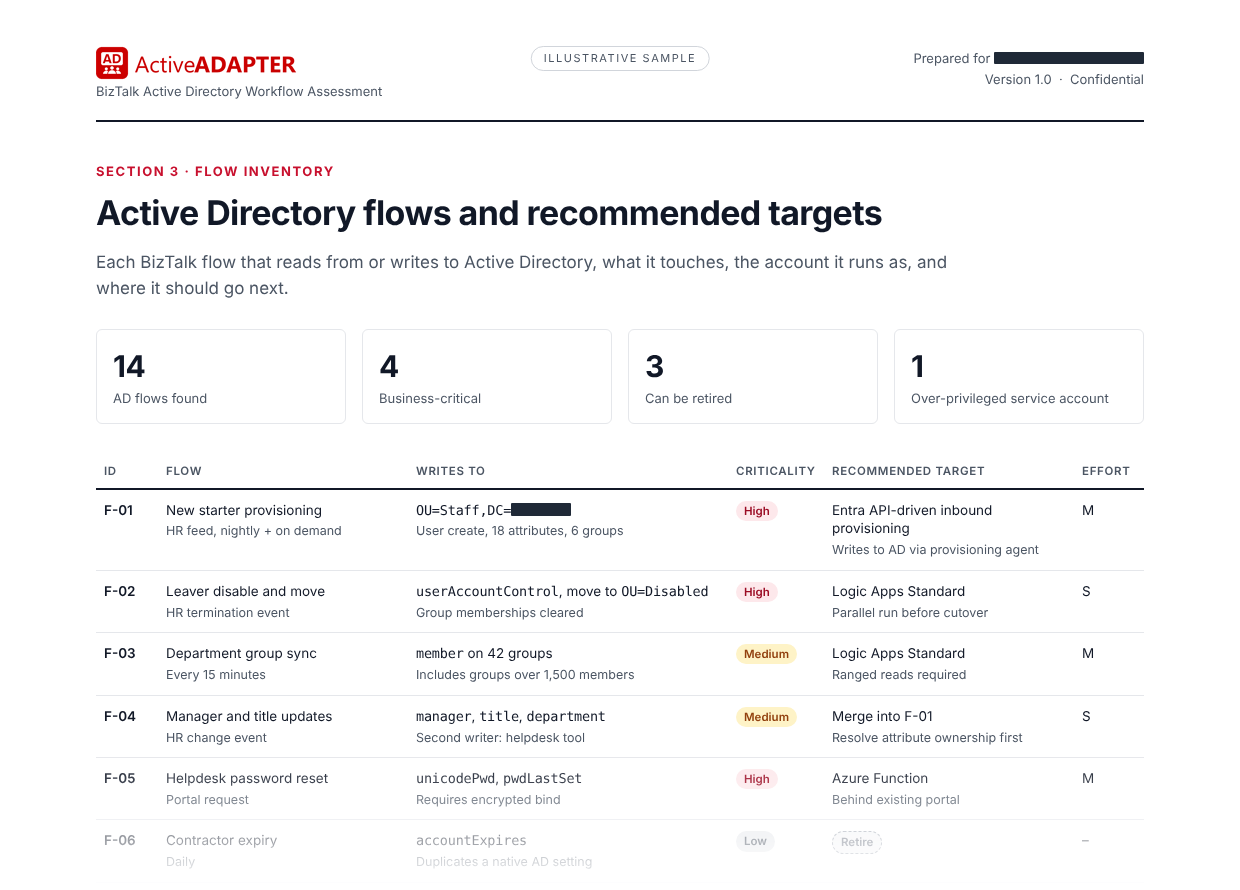
Every AD flow: the OUs and attributes it writes, the account it runs as, and who depends on it.
Recommendation per flow
Target platform, approach and rough effort.
Migration plan
Suggested order and grouping, parallel-running approach, and cutover risks.
Quick wins and risks
Flows that can be retired, and fragile ones that need attention first.
Plain-language summary
For managers and budget holders.
Walkthrough session
With your team, to go through findings and questions.
Inside the report
- Plain-language summary
- Inventory of Active Directory flows
- Recommendation per flow: target, approach, effort
- Migration plan: order, grouping, parallel running, cutover
- Quick wins and risks
How it works
A free call, then a fixed-price assessment, then the migration itself if you want me to do it.
- Free call: I size your BizTalk estate with you and confirm the fixed price for the assessment.
- Assessment (usually a week, two for a large estate; remote and read-only): I review your BizTalk applications, bindings, orchestrations and maps, look at the AD side, and talk briefly with the people who know the flows. Nothing in your environment changes.
- Report and walkthrough: a prioritised plan that is yours to keep. You can stop here.
- Migration: I rebuild the flows in short, fixed-scope packages, remotely, with parallel running before each cutover.
What I need for the assessment
Read-only access to the BizTalk configuration (or exports of it), a named contact, and an hour or two of your team’s time.
Assessment price
The exact fixed price is confirmed in the free initial call, before any work starts. It’s based on the size of your BizTalk estate, so a small estate costs less.
If you go on to have me migrate the flows, the assessment fee is credited against that work.
After the assessment
I can take the migration from here, or the plan is yours to use however suits you.
I migrate the flows
In short, fixed-scope packages, remotely, with parallel running before each cutover.
A mix
I take the trickiest AD flows; your team or partner handles the rest.
Your team or partner
Your own team or migration partner builds it, using the report.

Next step
Book a call, or email me a question.
Max 30 minutes, no preparation needed. You leave with a fixed price for the assessment.
Prefer email? I reply personally, usually within a day.